
Improve your genealogy searches by learning simple search engine techniques that help you find the right ancestor records faster.
Successful family history research often depends on how well you search. A small change in your search terms can mean the difference between thousands of unrelated results and a short list of useful records. This is especially true when an ancestor’s name is also a common word, a place name, a religious term, an occupation, or a phrase that appears frequently in newspapers and online databases.
A reader recently asked how to adjust genealogy search terms when an ancestor’s name creates confusing results. For example, searching for a person named Delia Christian may bring up church services, Christian organizations, or publications with the word “Christian” in the title. Searching for Minnie Coleman Maiden may return results about “maiden names” instead of records about the actual person.
The solution is to understand a few basic search engine principles. Whether you are using Google, a newspaper archive, or a genealogy database, knowing how to narrow and refine your search can save time and help you uncover better ancestor records.
Genealogy Searches on Google: Know These Three Little Words
Three simple words can dramatically improve your genealogy searches and help you control what appears in your results:
- AND
- OR
- NOT
These are called search operators. They tell a search engine how to treat the words you type. Once you understand how they work, you can create more focused searches for ancestors, family surnames, locations, dates, and historical records.
The AND Search
Let’s start with a search for Delia Christian. When you type two words into Google, the search engine usually treats the space between them as AND. In other words, Google looks for pages that include both Delia and Christian, even if those words are not side by side.
Tip: In many search engines, AND is assumed automatically. Some databases may also allow you to use a plus sign to indicate that a term must be included.
A search for Delia Christian or Delia AND Christian can return a very large number of results. Many of those results may have nothing to do with a person named Delia Christian. Because “Christian” is also a common religious term, the results may include churches, religious fellowships, Christian Science references, and other unrelated pages.
That is not very helpful when you are trying to identify one ancestor. Fortunately, there are several ways to narrow the search.
Use Quotation Marks
Quotation marks tell the search engine to look for words exactly as a phrase. If you search for “Delia Christian”, the results should include that exact name with the words appearing together.
This immediately reduces the number of results and makes them more relevant. However, depending on the name, you may still see modern references, social media profiles, or pages that are not connected to your family history research. Quotation marks are an excellent first step, but they are often not the final step.
Add More Keywords
After placing a name in quotation marks, add other useful genealogy keywords. For example, you might search for:
“Delia Christian” AND genealogy
This tells the search engine to look for the exact name “Delia Christian” and also include the word genealogy. You can continue adding terms that relate to your research question, such as a county, state, birth year, spouse’s name, or record type.
Adding a genealogy-related keyword often makes results more manageable. You can narrow the search further by adding a location or date. For example, if you know the ancestor lived in a specific county, include that county in your search. A location is one of the most powerful filters in family history research because it separates your ancestor from other people with the same or similar names.
A smaller result list is easier to review and more likely to contain records that matter. Always remember that locations and dates should only be added when they fit your research question. In the example above, the county was added simply to demonstrate how the search process works.
Improve Your Genealogy Searches With the OR Search
The OR search is useful when you want results that may contain one term or another. It broadens your search instead of narrowing it. This can be helpful when different words may describe the same concept.
For example:
North Carolina genealogy OR family history
This search asks for results that include either “genealogy” or “family history.” Because OR expands the search, it can produce a very large number of results. It is useful when you are exploring a topic broadly, but it may be less helpful when you are searching for one specific ancestor.
Use OR when you need to account for alternate wording. For example, one website may use “family history,” while another uses “genealogy.” In ancestor research, OR can also help when a person used more than one name or spelling, but be prepared for a wider set of results.
The NOT Search
The NOT search is one of the most useful tools for reducing irrelevant genealogy search results. It tells the search engine to exclude a word from the results. In Google, this is usually done with a minus sign.
For example, a search for Collie Family may return many results about collie dogs instead of people with the surname Collie.
If dogs are not part of your family tree, you need a way to remove those results. A NOT search can help:
Collie Family -dog
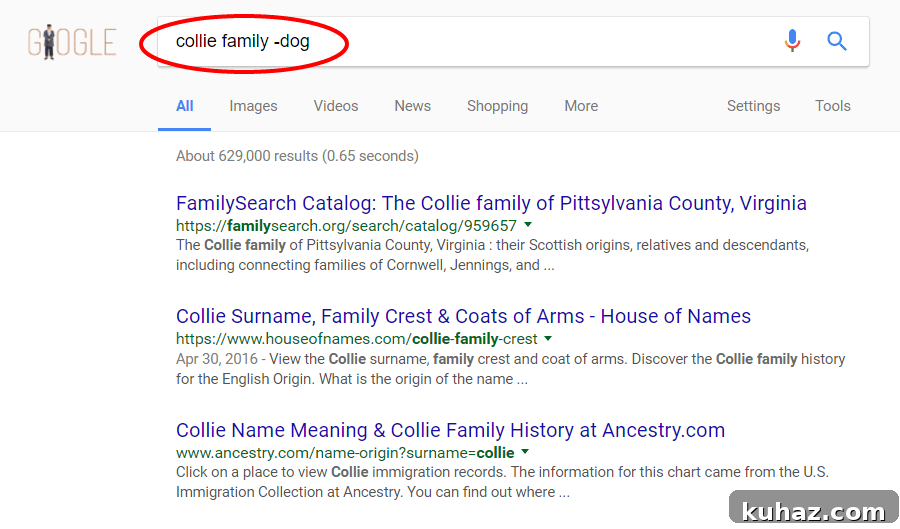
This version excludes pages that include the word “dog,” making it more likely that the remaining results refer to people, surnames, and family records. From there, you can refine the search by adding a place, date, spouse, occupation, or other identifying detail.
Genealogy Searches on Databases Other Than Google
Genealogy websites, newspaper archives, and historical record databases do not all search in the same way. Each database has its own search forms, filters, and rules. Some allow you to search by first name, last name, date range, location, record type, or keyword. Others include options to exclude specific words, match exact names, or search name variations.
GenealogyBank allows users to search by first and last name and also exclude terms. For example, a search for Delia Christian may include results about church fellowships. Adding “church” as an exclusion term can reduce unrelated results. Excluding another term, such as “science,” may also change the result list depending on what appears in the database.
A search for “Delia Christian” on FindMyPast may return results where the two words appear together as a name. In that case, fewer exclusions may be needed because the database is already treating the search more precisely.
The important takeaway is to spend a few minutes learning how each database works before you begin a long research session. Most genealogy websites include help pages or search tips. Understanding those options can save valuable time and help you find records you might otherwise miss.
- Find Ancestry.com search tips HERE.
- Find FindMyPast search tips HERE.
- Find MyHeritage search tips HERE.
Use the search tools designed for the database you are using. Combine exact phrases, exclusions, locations, dates, and alternate terms when appropriate. With a clear search strategy, your genealogy searches will become more focused, efficient, and productive.
Other Posts of Interest:
- Use A Genealogy Wildcard Search For Better Ancestor Search Results
- How To Use Ancestry.com’s Card Catalog
- How To Create A Genealogy Research Plan
Please note that this post contains affiliate links, which means I may earn a commission if you choose to purchase a product or service. This does not cost you extra. I only recommend products and services I use and believe may be helpful.